Source-aware router data

Router login & network troubleshooting

Default Router Settings, Login IPs & Network Tools

Find your router’s default IP, local login method and setup guidance, then troubleshoot Wi-Fi, DNS, NAT and home-network problems with practical tools and device-specific references.

Browse router IPs Browse verified brands Network tools

Reviewed router model guides

Choose your exact router model for model-specific management addresses, sign-in behavior, recovery guidance, firmware notes and configuration details.

View router models

Router login: the safe way to reach your own admin page

A router login is a local network task. The goal is to open the management interface of the router or gateway you are actually connected to, not to submit a password to a website on the public internet.

1

Connect locally

Join the router’s main Wi-Fi or use Ethernet. Guest networks can intentionally block management access, and mobile data or a VPN can send traffic away from the local LAN.

2

Confirm the gateway

Read the Default Gateway or Router value from your device. Common private addresses exist, but the address assigned to your current network is more reliable than guessing 192.168.1.1 or 192.168.0.1.

3

Open the local interface

Type the gateway IP or documented local hostname directly into the browser address bar. A private IP such as 192.168.x.x or 10.x.x.x normally cannot be reached from outside that local network.

4

Use the correct credential

Use the administrator password created during setup, printed as a device-access credential, stored in the official app/account, or documented for that exact model. The Wi-Fi password is not automatically the admin password.

If a router-login result on the web asks you to enter your router password into that website, stop. A genuine local-login guide may link you to a private address, but the credential itself should be submitted only to your own router, gateway, mesh app, or official provider/manufacturer workflow.

How Can You Find Your Router IP Instead of Guessing?

The default gateway shown by the operating system is normally the router that currently routes traffic for that device. This is especially important on mesh networks, ISP gateways, double-NAT setups, and networks where the LAN subnet was changed.

WindowsOpen Network details or run ipconfig and read Default Gateway for the active adapter.
macOSOpen the active network details and find Router, or use the route information in Terminal.
iPhone / iPadOpen Settings → Wi-Fi → the connected network and read Router.
AndroidOpen the connected Wi-Fi network details. Depending on Android/vendor skin, the field can be Gateway or Router.
LinuxUse the active connection details or a route command such as ip route; do not use the Windows-only ipconfig command.

A gateway address identifies a network interface, not a brand. The same private IP can be used by routers from many manufacturers. That is why our IP guides separate address facts from model-specific passwords and link into exact brand/model/provider pages when evidence exists. See the complete router-login guide.

Router login page not opening? Diagnose the layer that failed

Resetting the router is rarely the best first move. The symptom usually tells you whether the problem is the address, local connection, browser, topology, credential, or the router itself.

SymptomMost useful first checkWhat not to assume
Search results appear instead of a login pageEnter http:// or https:// plus the gateway directly in the address bar.The router is not necessarily offline.
Connection timed out / refusedVerify the active default gateway and that you are on the main local network.A popular private IP is not automatically your router.
Another router opensCheck for an ISP gateway plus your own router, mesh node, extender, or AP-mode device.One household has only one management interface.
Login form opens but password failsIdentify exact model/revision and current credential source: owner-created, device label, app/account, or provider documentation.admin/admin is universal.
Privacy/certificate warning on a local IPConfirm the IP is truly your router before proceeding; many embedded interfaces use a self-signed/local certificate.Every certificate warning is harmless.
Internet works but admin page is blockedLeave guest Wi-Fi, disable an interfering VPN temporarily if appropriate, and check whether the system is app-managed.Internet access proves local-management access is allowed.

Work through the complete router-login troubleshooting sequence.

What Can You Change After Router Login?

Menu names differ, but the underlying jobs are similar. Make one logical change at a time, record the previous value, and avoid changing WAN or provider settings unless you know why they are needed.

Wi-Fi & access

SSID, Wi-Fi password, security mode, guest/IoT network, bands, channels, transmit settings, mesh options and connected-device controls.

LAN & internet

DHCP leases/reservations, LAN subnet, DNS, IPv6, WAN status, bridge/passthrough behavior, port forwarding, UPnP and DDNS. Provider WAN values can be service-critical.

Security & maintenance

Administrator password, firmware updates, backup/restore, remote administration, firewall features, parental controls and logs. Use official firmware for the exact hardware revision.

Before changing anything important

  • Photograph or export the current configuration where the device supports it.
  • Keep Ethernet available when changing Wi-Fi names, passwords, bands, security modes, or mesh settings.
  • Do not flash firmware for a similar-looking model or a different hardware revision.
  • On an ISP gateway, understand whether voice, IPTV, fiber authentication, static IP, or remote provisioning depends on the existing configuration.
  • Use factory reset only when recovery requires it and you are prepared to rebuild the configuration.

Router login FAQs

Is 192.168.1.1 the login for every router?

No. 192.168.1.1 is a common private LAN address, but routers can use many other private addresses and a customized network can change the default. Read the gateway used by your connected device.

What is the default router username and password?

There is no universal pair. Older devices sometimes shipped with shared defaults, while many current routers create an administrator password during setup, use a unique device-access code, or authenticate through an app/account. Match credentials to the exact model and current firmware/provider instructions.

Why can I use Wi-Fi but not open the router page?

You may be on guest Wi-Fi, behind another router, using a VPN, opening the wrong gateway, or using a system managed mainly through an app. Internet connectivity and local management access are separate things.

Does 10.0.0.1 always mean Piso WiFi?

No. 10.0.0.1 is a private IPv4 address that can be used on many networks. In the Philippines it is also associated with some Piso WiFi deployments; AdoPiSoft documents it for specific configurations, but the IP alone does not identify the vending platform. Open the Piso WiFi hub.

Can this website see my router password?

No. The purpose of these guides is to help you reach and understand your own local network. We do not need your router administrator password, Wi-Fi password, voucher code, wallet PIN, or OTP.

Should I reset the router if I forgot the password?

Use documented password/account recovery first when it exists. A factory reset can erase Wi-Fi, WAN, DHCP, port-forwarding, parental-control, VPN, and provider-specific settings, so it should be a deliberate recovery step rather than a routine login trick.

Troubleshooting help

More
Help Articles

Piso WiFi After a Power Outage: Recovery Checklist

After power loss, restore the network in dependency order: ISP modem/ONT, controller/storage/database, switch, access points and payment hardware. A portal can come back before the WAN or transaction system is ready.

Help Articles

Piso WiFi Randomized MAC Address and Session Problems

Modern phones can use a private/randomized Wi-Fi MAC address. If a Piso WiFi platform associates paid time or vouchers with device identity, changing that identity can make a valid session appear missing even though the payment record still exists.

Help Articles

Piso WiFi DHCP and DNS Troubleshooting

When devices join the SSID but cannot reach the portal or internet, check whether they received a valid client IP, subnet, gateway and DNS. DHCP and DNS failures can look like a broken captive portal even when the Wi-Fi radio itself is fine.

Technical guides

More
Technical Articles

IPv6 Link-Local Addresses (fe80::/10) Explained

IPv6 interfaces automatically use link-local addressing for essential neighbor and router discovery. Seeing fe80:: does not mean IPv6 is broken or globally reachable.

Step-by-step guides

More
How-To Guides

Piso WiFi Operator Daily Checklist

A short daily check catches failures before they become lost sales: confirm WAN health, controller/storage status, captive portal, one transaction path, access-point availability, backups and physical/payment hardware.

How-To Guides

How to Design Piso WiFi Rates and Time Packages?

Good rate plans balance customer clarity, real backhaul capacity, session policy and operating costs. Start with a small number of understandable packages and measure peak usage before adding complex bonuses or long sessions.

How-To Guides

How to Add an Access Point to AdoPiSoft Piso WiFi?

AdoPiSoft documents adding access points behind the vending/controller network. The access point should extend the intended customer LAN without accidentally creating a second DHCP/NAT boundary unless the design explicitly calls for one.

Networking fundamentals

More
Education Articles

How Does a Piso WiFi Captive Portal Work?

A captive portal sits between a newly connected client and normal internet access. The network gives the client local addressing, detects or redirects an unauthenticated web request, presents payment/login/session controls, then authorizes traffic according to the controller’s policy.

Testing & methodology

More

Visual Router Login & Gateway Guides

These original instructional screens show the workflow without pretending to reproduce a specific manufacturer firmware interface. Exact menus vary by router model and firmware.

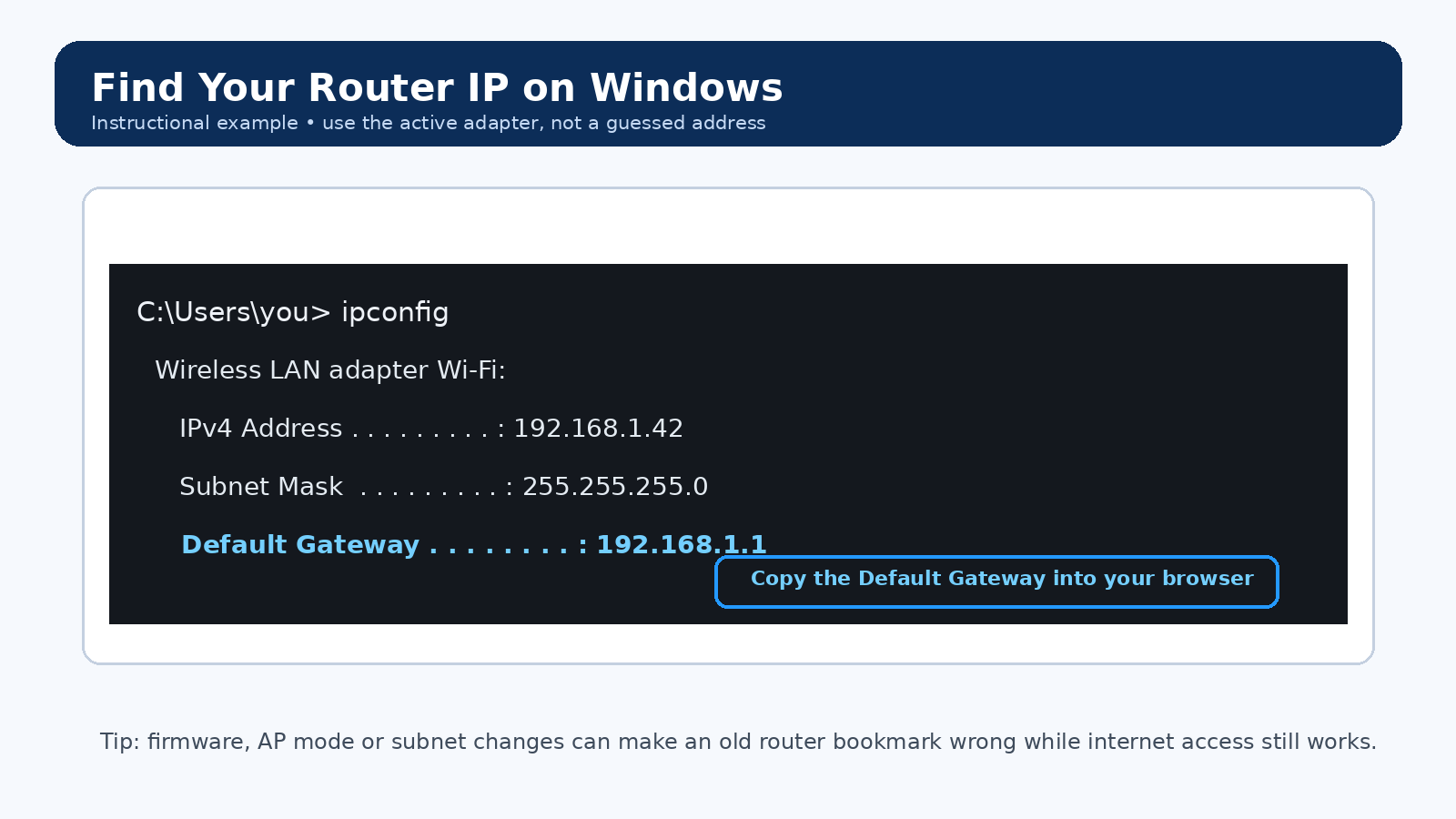
Windows-style instructional screen showing how to locate the Default Gateway with ipconfig
Find the active Default Gateway before trying a common router IP.
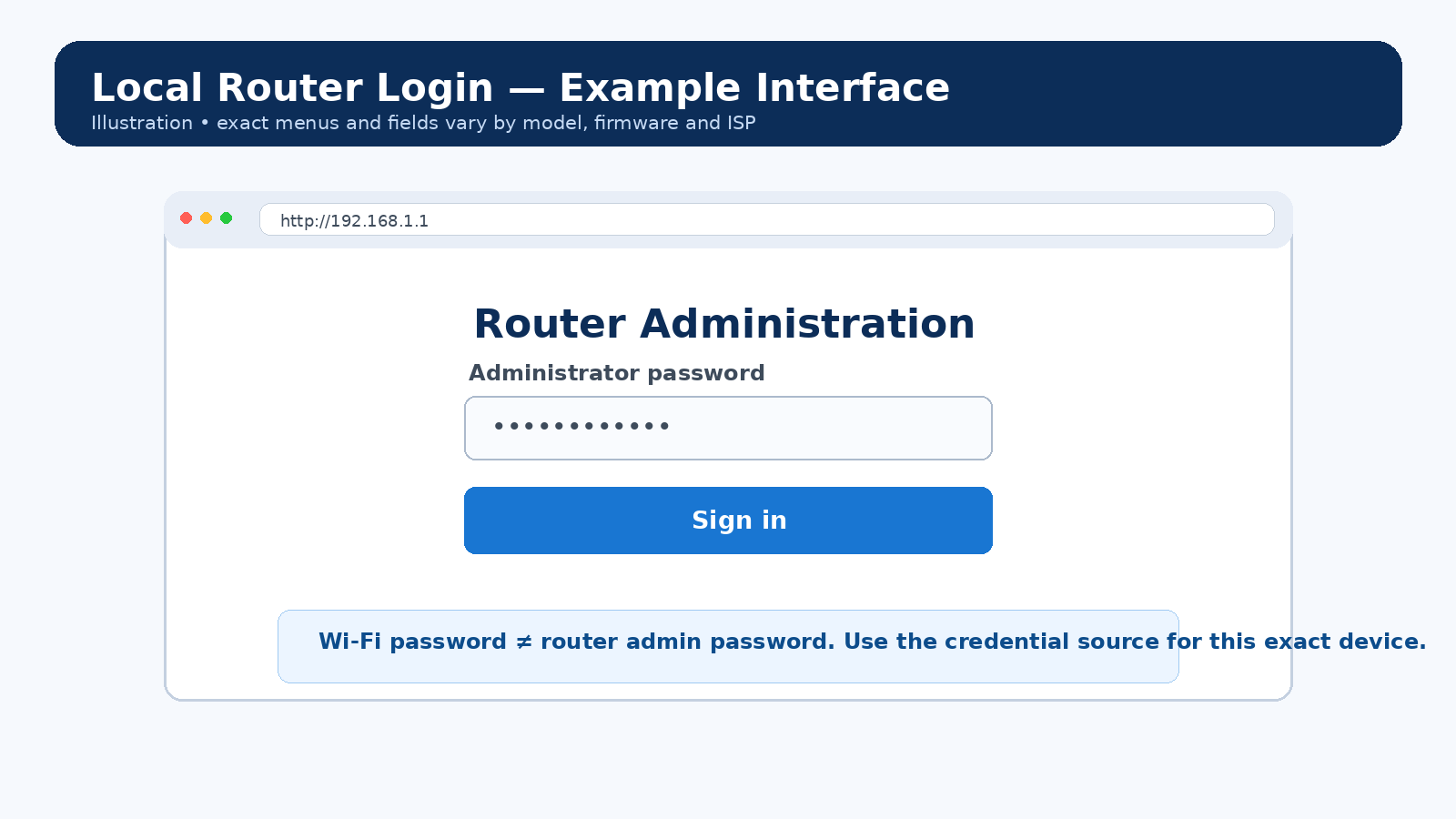
Generic local router login example explaining administrator credentials
A router login uses the administrator credential for that device—not automatically the Wi-Fi password.
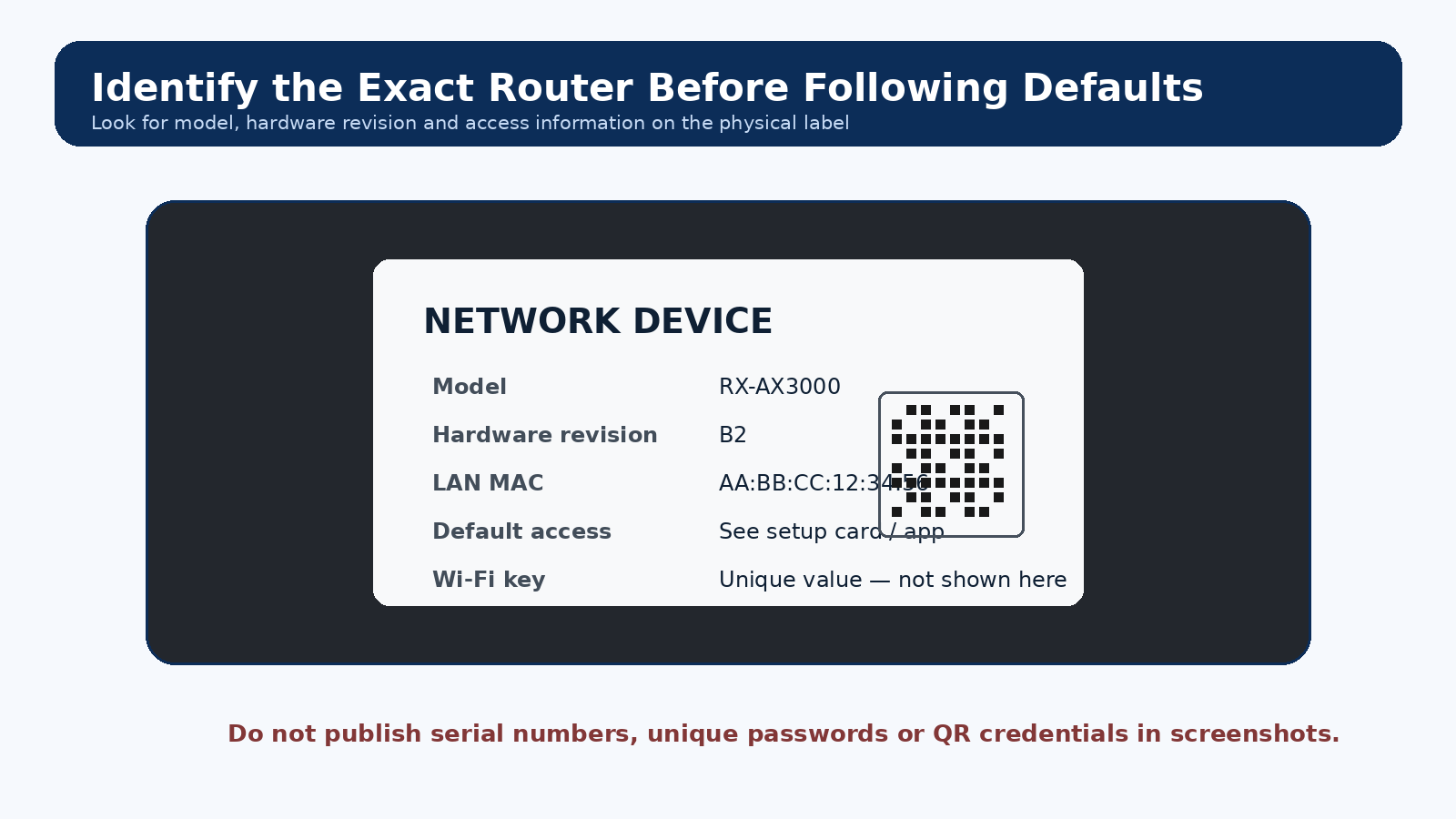
Example router label showing where to look for model, hardware revision and device access information
Identify the exact model and hardware revision before following model-specific instructions.
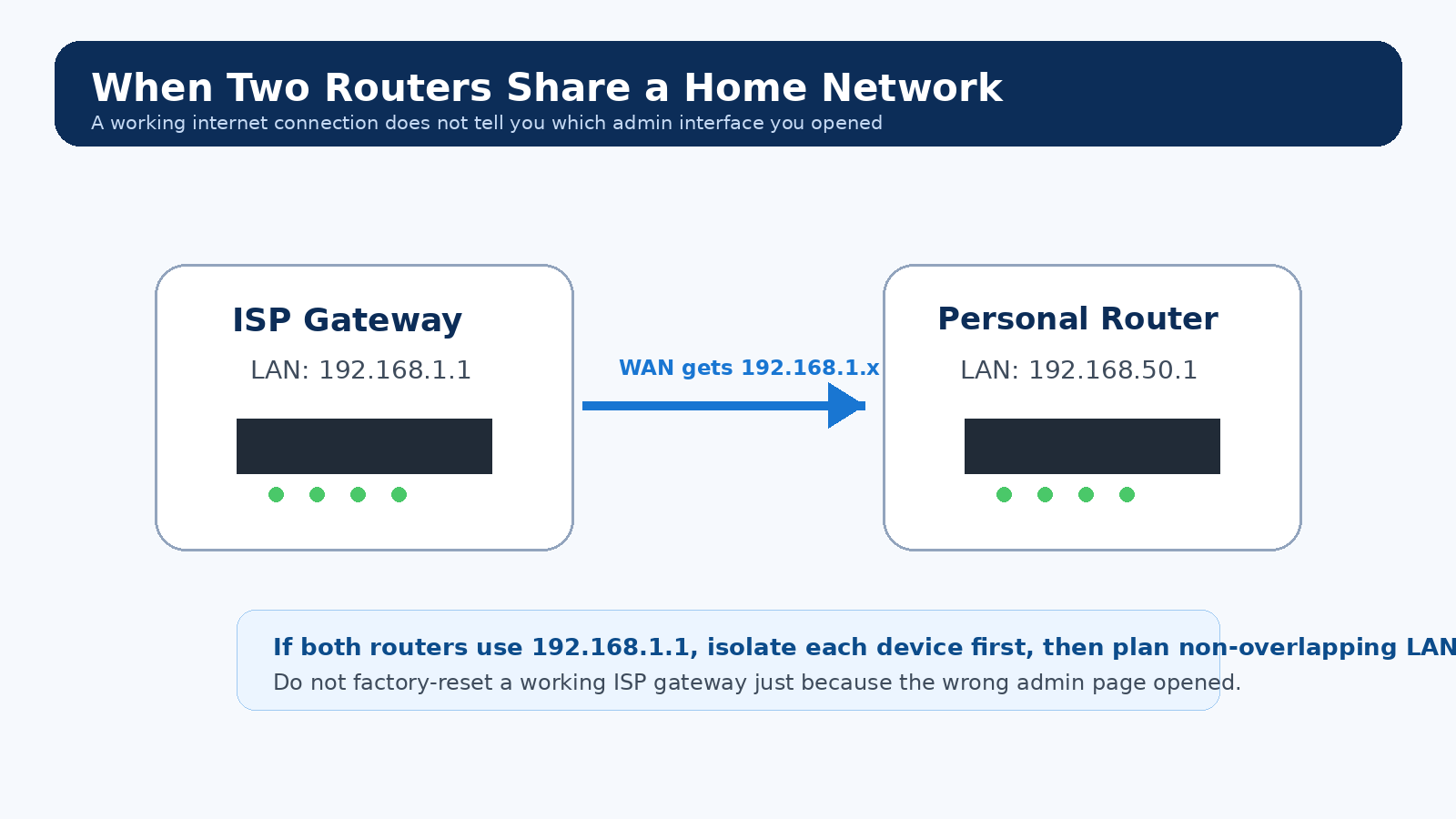
Instructional diagram showing an ISP gateway and personal router using different management addresses
Two-router homes can expose a different admin page than the one you expected.

Router Problems People Actually Run Into

These questions are based on recurring problems reported in networking communities and support discussions. The answers are independently written and focus on safe diagnostics rather than guessed passwords.

Why does 192.168.1.1 time out even though my internet works?

First read the active Default Gateway on the device you are using. A changed LAN subnet, router/AP mode, mesh adoption, or a second router can make an old bookmark wrong. If another device can open the page, compare the affected device for VPN/proxy use, guest isolation, endpoint security, and its current route.

Reddit HomeNetworking: phone can reach router while PC cannot · NETGEAR: router access troubleshooting

Why does the router login page open on my phone but not on my PC?

That points first to the PC path, not automatically to a dead router. Compare the PC gateway with the phone network, disconnect an interfering VPN when safe, verify the PC is not on a guest/isolated network, and test a clean browser profile before considering a reset.

Reddit HomeNetworking report · NETGEAR access troubleshooting

Why do I see the ISP gateway instead of my own router?

You may have two routing devices or overlapping LAN subnets. Check the client Default Gateway and the downstream router WAN address. If both devices use the same subnet or management IP, map the topology and use non-overlapping LANs or an intentional bridge/access-point design instead of repeatedly resetting devices.

Reddit HomeNetworking: double-router forwarding case · RFC 1918 private address ranges

Why does the password printed on the router not work for the admin page?

The printed value may be the Wi-Fi key, a recovery value, or an initial setup credential rather than the current administrator password. Some products also change the login field according to the original setup method. Identify the exact model and workflow before resetting it.

Reddit HomeNetworking: sticker/access-code confusion · ARRIS G34/G36 login-flow example

Why does my router show a privacy or certificate warning?

Some local router interfaces use HTTPS in a way that can trigger a browser certificate warning. Confirm that the destination is your own local gateway and follow the exact vendor procedure for that model. Do not generalize this to certificate warnings on public websites.

TP-Link community: local HTTPS certificate warning · Linksys: local HTTPS login warning

Why is the admin page blank after I log in?

A blank page can come from blocked JavaScript, stale cached assets, extensions, endpoint security, or a firmware/UI fault. Try the vendor-documented local URL, a clean browser profile, and another trusted local device before a factory reset.

Reddit NETGEAR: admin access differs by client device · NETGEAR access troubleshooting

Why did my router IP change after a firmware update or mode change?

Access-point mode, mesh/node adoption, a LAN-subnet change, or upstream DHCP can alter the management address. Renew the client lease and read the current gateway or the upstream router client list instead of relying on an old bookmark.

Community report: former gateway no longer responds · NETGEAR R7000 manual: AP-mode context

Why does port forwarding fail even though the rule looks correct?

Test the service on the LAN first, keep the server on a stable local address, check the host firewall, then compare the router WAN IPv4 with the public IPv4 seen from the internet. Another upstream router or carrier-grade NAT can stop ordinary unsolicited inbound IPv4 traffic before it reaches your forwarding rule.

Reddit HomeNetworking: double NAT / forwarding case · RFC 6598: shared address space used for CGNAT

Community reports help us identify recurring symptoms; manufacturer, provider and standards documentation remains the source for device-specific defaults and procedures.